> ## Documentation Index
> Fetch the complete documentation index at: https://docs.hypermid.io/llms.txt
> Use this file to discover all available pages before exploring further.
# Cross-Chain Swap
> Complete guide to the swap lifecycle: quote, execute, and track
This guide covers the full lifecycle of a cross-chain swap through Hypermid: discovering chains and tokens, getting a quote, executing the swap, and tracking its status.
## Endpoints You'll Use
| Step | Endpoint | Purpose |
| ---- | -------------------------------------------- | ------------------------------------ |
| 1 | [`GET /v1/chains`](/api-reference/chains) | Discover supported blockchains |
| 2 | [`GET /v1/tokens`](/api-reference/tokens) | List tokens available on a chain |
| 3 | [`GET /v1/quote`](/api-reference/quote) | Get the best swap price and route |
| 4 | [`POST /v1/execute`](/api-reference/execute) | Get transaction data to sign |
| 5 | [`GET /v1/status`](/api-reference/status) | Track swap progress until completion |
Steps 1-2 are optional if you already know the chain IDs and token addresses. Most integrations start at Step 3.
## Overview
A cross-chain swap moves tokens from one blockchain to another in a single user action. Hypermid's smart routing engine evaluates multiple bridge strategies in parallel across **90+ supported blockchains** — including EVM chains, Solana, Bitcoin, XRP, PulseChain, TON, and more — and returns the optimal path automatically.
**Swapping to/from PulseChain?** See the [PulseChain Swaps guide](/guides/superswap) for specific examples and token addresses.
## Swap lifecycle
Every swap follows four phases: discover available chains and tokens, get a quote, execute the transaction, and track its status until settlement.
```mermaid theme={"system"}
flowchart LR
A[Discovery\nChains & tokens] --> B[Quote\nBest route & price]
B --> C[Execute\nSign & broadcast]
C --> D[Track\nPoll status]
```
### 1. Discovery
The app fetches all supported chains and tokens from the routing engine. The engine maintains a unified registry across all bridge types, so the user sees one clean token list regardless of which underlying strategy will fulfill the swap.
### 2. Quote
Hypermid queries its bridge providers simultaneously for the selected token pair. The routing engine compares all returned routes — factoring in output amount, gas cost, and estimated execution time — and surfaces a single best quote. The user never chooses a provider.
### 3. Execute
The user approves the transaction in their wallet. For EVM chains, this may involve a token approval step followed by the swap transaction itself. The app records a pending swap event via the Hypermid API, which gets updated on completion — no duplicate records.
### 4. Track
The app polls the status endpoint using the source transaction hash. Status transitions through `PENDING` → `COMPLETED` (or `FAILED`), and the UI reflects progress in real time. Cross-chain settlement ranges from seconds to minutes depending on the bridge strategy used.
***
## Architecture
Hypermid abstracts away bridge complexity behind a single smart routing engine. The user interacts with Hypermid — never with individual bridge providers.
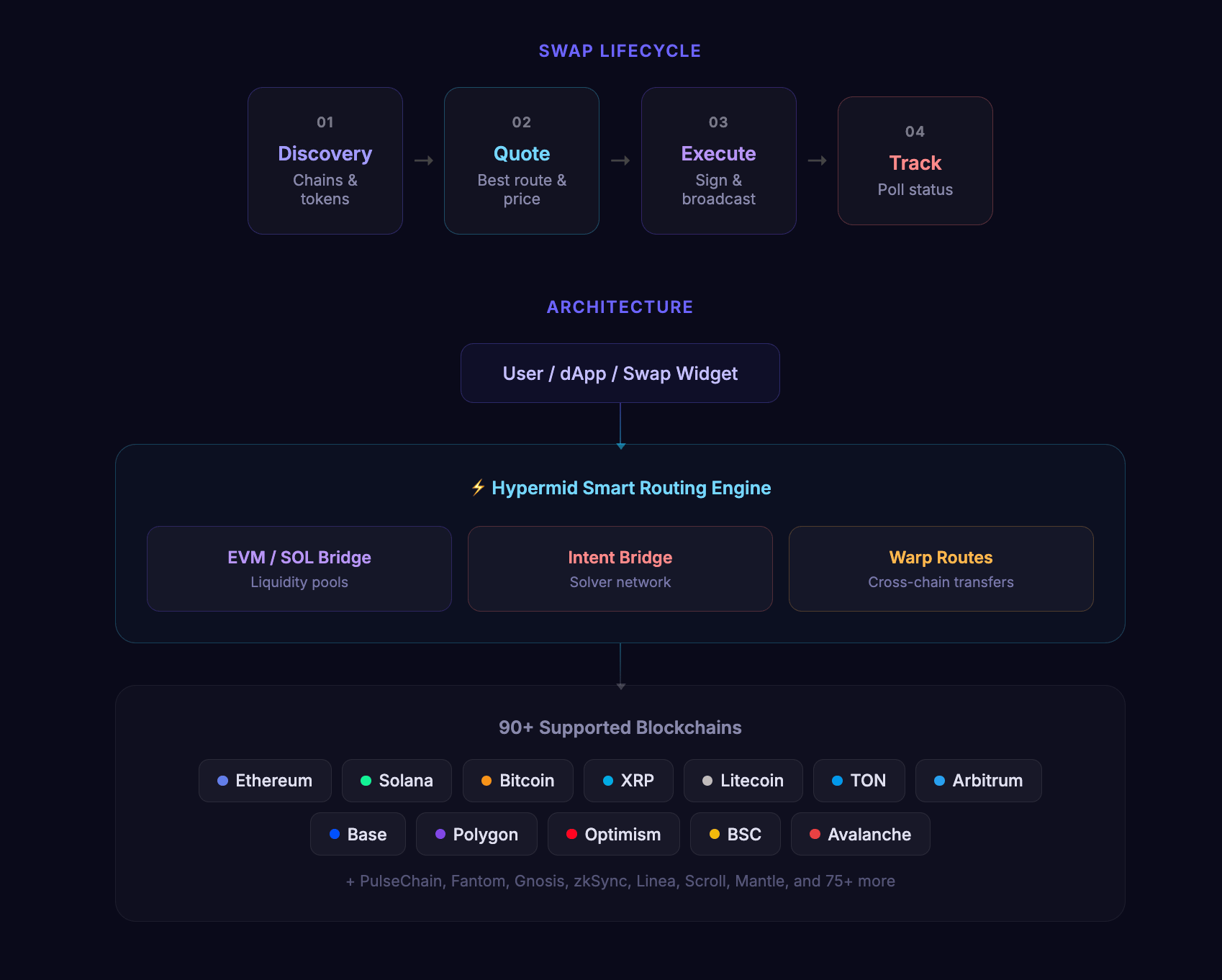 ### Bridge strategies
| Strategy | Mechanism | Coverage |
| -------------------- | ---------------------------------------------------------------------- | ------------------------------------------------------------------------------------------- |
| **EVM / SOL bridge** | Routes through liquidity pools across EVM-compatible chains and Solana | Ethereum, Polygon, Arbitrum, Optimism, BSC, Avalanche, Base, Solana, and 70+ more |
| **Intent bridge** | Matches counterparties via a solver network for optimal fills | Cross-chain swaps where solver competition yields better pricing |
| **Warp routes** | Direct token transfers via standardised messaging | Extended coverage for chains like PulseChain and other networks outside core bridge support |
The routing engine selects the best strategy per swap automatically. In many cases, a single swap may be split across strategies to optimise for price and speed.
***
## Step 1: Discover Supported Chains
Fetch the list of supported blockchains to populate your chain selector.
```typescript TypeScript theme={"system"}
const chains = await client.getChains();
console.log(chains.chains);
// [{ id: 1, name: "Ethereum", type: "EVM", nativeToken: {...} }, ...]
```
```bash cURL theme={"system"}
curl https://api.hypermid.io/v1/chains \
-H "X-API-Key: your-api-key"
```
## Step 2: Discover Tokens
Fetch tokens available on your source and destination chains.
```typescript TypeScript theme={"system"}
const tokens = await client.getTokens({
chains: [1, 42161], // Ethereum and Arbitrum
});
const ethTokens = tokens.tokens[1]; // Tokens on Ethereum
const arbTokens = tokens.tokens[42161]; // Tokens on Arbitrum
```
```bash cURL theme={"system"}
curl "https://api.hypermid.io/v1/tokens?chains=1,42161" \
-H "X-API-Key: your-api-key"
```
## Step 3: Get a Quote
Request the best swap route for your token pair and amount.
```typescript TypeScript theme={"system"}
const quote = await client.getQuote({
fromChain: 1, // Ethereum
toChain: 42161, // Arbitrum
fromToken: "0x0000000000000000000000000000000000000000", // ETH
toToken: "0xaf88d065e77c8cC2239327C5EDb3A432268e5831", // USDC on Arbitrum
fromAmount: "1000000000000000000", // 1 ETH in wei
fromAddress: "0xd8dA6BF26964aF9D7eEd9e03E53415D37aA96045",
slippage: 0.03, // 3% slippage tolerance
});
// The SDK throws HypermidError on failure — wrap in try/catch if you
// need to handle specific error codes (see /guides/error-handling).
console.log("Estimated output:", quote.estimate.toAmount);
console.log("Estimated USD value:", quote.estimate.toAmountUSD);
console.log("Provider:", quote.tool);
console.log("Execution time:", quote.estimate.executionDuration, "seconds");
```
```bash cURL theme={"system"}
curl -X GET "https://api.hypermid.io/v1/quote?\
fromChain=1&\
toChain=42161&\
fromToken=0x0000000000000000000000000000000000000000&\
toToken=0xaf88d065e77c8cC2239327C5EDb3A432268e5831&\
fromAmount=1000000000000000000&\
fromAddress=0xd8dA6BF26964aF9D7eEd9e03E53415D37aA96045&\
slippage=0.03" \
-H "X-API-Key: your-api-key"
```
Set `slippage` to control how much price movement is acceptable. The default is typically 3% (0.03). For stablecoin swaps, consider using 0.5% (0.005).
## Step 4: Execute the Swap
Submit the swap for execution. The response depends on the route type.
```typescript TypeScript theme={"system"}
const execution = await client.execute({
fromChain: 1,
toChain: 42161,
fromToken: "0x0000000000000000000000000000000000000000",
toToken: "0xaf88d065e77c8cC2239327C5EDb3A432268e5831",
fromAmount: "1000000000000000000",
fromAddress: "0xd8dA6BF26964aF9D7eEd9e03E53415D37aA96045",
toAddress: "0xd8dA6BF26964aF9D7eEd9e03E53415D37aA96045",
slippage: 0.03,
});
// The SDK throws on failure — `execution` is already the unwrapped response.
```
```bash cURL theme={"system"}
curl -X POST "https://api.hypermid.io/v1/execute" \
-H "Content-Type: application/json" \
-H "X-API-Key: your-api-key" \
-d '{
"fromChain": 1,
"toChain": 42161,
"fromToken": "0x0000000000000000000000000000000000000000",
"toToken": "0xaf88d065e77c8cC2239327C5EDb3A432268e5831",
"fromAmount": "1000000000000000000",
"fromAddress": "0xd8dA6BF26964aF9D7eEd9e03E53415D37aA96045",
"toAddress": "0xd8dA6BF26964aF9D7eEd9e03E53415D37aA96045",
"slippage": 0.03
}'
```
### Handling the Response
The execution response contains either a `transactionRequest` (wallet mode) or a `depositAddress` (manual deposit mode).
#### Wallet Mode (EVM/Solana)
```typescript theme={"system"}
if (execution.transactionRequest) {
const txRequest = execution.transactionRequest;
// Send the transaction using your wallet/signer
const tx = await wallet.sendTransaction({
to: txRequest.to,
data: txRequest.data,
value: txRequest.value,
gasLimit: txRequest.gasLimit,
gasPrice: txRequest.gasPrice,
});
console.log("Transaction sent:", tx.hash);
// Wait for confirmation
const receipt = await tx.wait();
console.log("Confirmed in block:", receipt.blockNumber);
}
```
#### Manual Deposit Mode
```typescript theme={"system"}
if (execution.depositAddress) {
// For wallet-connected users: use the transactionRequest if available
if (execution.transactionRequest) {
const tx = await wallet.sendTransaction(execution.transactionRequest);
}
// For manual deposits: display the deposit address to the user
console.log("Deposit address:", execution.depositAddress);
console.log("Memo (if required):", execution.memo);
console.log("Deposit ID:", execution.depositId);
}
```
## Step 5: Track Status
### Transaction Status
Poll `GET /v1/status` with the transaction hash:
```typescript TypeScript theme={"system"}
async function pollStatus(txHash: string, fromChain: number, toChain: number) {
while (true) {
const status = await client.getStatus({ txHash, fromChain, toChain });
console.log("Status:", status.status);
if (status.status === "DONE") {
console.log("Swap complete!");
console.log("Destination tx:", status.receiving?.txHash);
return status;
}
if (status.status === "FAILED") {
console.error("Swap failed:", status.message);
throw new Error("Swap failed");
}
// Poll every 10 seconds
await new Promise((resolve) => setTimeout(resolve, 10000));
}
}
```
```bash cURL theme={"system"}
curl "https://api.hypermid.io/v1/status?\
txHash=0xYourTransactionHash&\
fromChain=1&\
toChain=42161" \
-H "X-API-Key: your-api-key"
```
### Manual Deposit Status
For manual deposit routes, poll `GET /v1/execute/deposit/status` with the deposit ID:
```typescript theme={"system"}
const depositStatus = await client.getDepositStatus({
depositId: execution.depositId,
});
console.log("Deposit status:", depositStatus.status);
```
## Complete Example
Here's a full working example that handles both route types:
```typescript theme={"system"}
import { Hypermid } from "@hypermid/sdk";
const client = new Hypermid({ apiKey: process.env.HYPERMID_API_KEY });
async function swap() {
// 1. Get a quote
const quote = await client.getQuote({
fromChain: 1,
toChain: 42161,
fromToken: "0x0000000000000000000000000000000000000000",
toToken: "0xaf88d065e77c8cC2239327C5EDb3A432268e5831",
fromAmount: "1000000000000000000",
fromAddress: "0xYourAddress",
});
console.log(`Swapping ${quote.estimate.fromAmountUSD} USD`);
console.log(`Estimated receive: ${quote.estimate.toAmountUSD} USD`);
// 2. Execute the swap
const exec = await client.execute({
fromChain: 1,
toChain: 42161,
fromToken: "0x0000000000000000000000000000000000000000",
toToken: "0xaf88d065e77c8cC2239327C5EDb3A432268e5831",
fromAmount: "1000000000000000000",
fromAddress: "0xYourAddress",
toAddress: "0xYourAddress",
});
// 3. Handle based on route type
if (exec.transactionRequest) {
const tx = await wallet.sendTransaction(exec.transactionRequest);
await tx.wait();
// 4. Poll status
let status;
do {
await new Promise((r) => setTimeout(r, 10000));
status = await client.getStatus({
txHash: tx.hash,
fromChain: 1,
toChain: 42161,
});
} while (status.status === "PENDING");
console.log("Final status:", status.status);
} else if (exec.depositAddress) {
console.log("Send tokens to:", exec.depositAddress);
if (exec.memo) console.log("With memo:", exec.memo);
}
}
swap().catch(console.error);
```
## Error Handling
Always handle these common errors:
| Error Code | What to Do |
| ------------------ | ------------------------------------------------------------- |
| `NO_ROUTE_FOUND` | Try different token pairs, increase amount, or widen slippage |
| `SLIPPAGE_ERROR` | Increase the `slippage` parameter and retry |
| `RATE_LIMIT` | Back off and retry after `meta.rateLimit.reset` |
| `UPSTREAM_TIMEOUT` | Retry the request after a brief delay |
See the [Error Handling Guide](/guides/error-handling) for comprehensive strategies.
### Bridge strategies
| Strategy | Mechanism | Coverage |
| -------------------- | ---------------------------------------------------------------------- | ------------------------------------------------------------------------------------------- |
| **EVM / SOL bridge** | Routes through liquidity pools across EVM-compatible chains and Solana | Ethereum, Polygon, Arbitrum, Optimism, BSC, Avalanche, Base, Solana, and 70+ more |
| **Intent bridge** | Matches counterparties via a solver network for optimal fills | Cross-chain swaps where solver competition yields better pricing |
| **Warp routes** | Direct token transfers via standardised messaging | Extended coverage for chains like PulseChain and other networks outside core bridge support |
The routing engine selects the best strategy per swap automatically. In many cases, a single swap may be split across strategies to optimise for price and speed.
***
## Step 1: Discover Supported Chains
Fetch the list of supported blockchains to populate your chain selector.
```typescript TypeScript theme={"system"}
const chains = await client.getChains();
console.log(chains.chains);
// [{ id: 1, name: "Ethereum", type: "EVM", nativeToken: {...} }, ...]
```
```bash cURL theme={"system"}
curl https://api.hypermid.io/v1/chains \
-H "X-API-Key: your-api-key"
```
## Step 2: Discover Tokens
Fetch tokens available on your source and destination chains.
```typescript TypeScript theme={"system"}
const tokens = await client.getTokens({
chains: [1, 42161], // Ethereum and Arbitrum
});
const ethTokens = tokens.tokens[1]; // Tokens on Ethereum
const arbTokens = tokens.tokens[42161]; // Tokens on Arbitrum
```
```bash cURL theme={"system"}
curl "https://api.hypermid.io/v1/tokens?chains=1,42161" \
-H "X-API-Key: your-api-key"
```
## Step 3: Get a Quote
Request the best swap route for your token pair and amount.
```typescript TypeScript theme={"system"}
const quote = await client.getQuote({
fromChain: 1, // Ethereum
toChain: 42161, // Arbitrum
fromToken: "0x0000000000000000000000000000000000000000", // ETH
toToken: "0xaf88d065e77c8cC2239327C5EDb3A432268e5831", // USDC on Arbitrum
fromAmount: "1000000000000000000", // 1 ETH in wei
fromAddress: "0xd8dA6BF26964aF9D7eEd9e03E53415D37aA96045",
slippage: 0.03, // 3% slippage tolerance
});
// The SDK throws HypermidError on failure — wrap in try/catch if you
// need to handle specific error codes (see /guides/error-handling).
console.log("Estimated output:", quote.estimate.toAmount);
console.log("Estimated USD value:", quote.estimate.toAmountUSD);
console.log("Provider:", quote.tool);
console.log("Execution time:", quote.estimate.executionDuration, "seconds");
```
```bash cURL theme={"system"}
curl -X GET "https://api.hypermid.io/v1/quote?\
fromChain=1&\
toChain=42161&\
fromToken=0x0000000000000000000000000000000000000000&\
toToken=0xaf88d065e77c8cC2239327C5EDb3A432268e5831&\
fromAmount=1000000000000000000&\
fromAddress=0xd8dA6BF26964aF9D7eEd9e03E53415D37aA96045&\
slippage=0.03" \
-H "X-API-Key: your-api-key"
```
Set `slippage` to control how much price movement is acceptable. The default is typically 3% (0.03). For stablecoin swaps, consider using 0.5% (0.005).
## Step 4: Execute the Swap
Submit the swap for execution. The response depends on the route type.
```typescript TypeScript theme={"system"}
const execution = await client.execute({
fromChain: 1,
toChain: 42161,
fromToken: "0x0000000000000000000000000000000000000000",
toToken: "0xaf88d065e77c8cC2239327C5EDb3A432268e5831",
fromAmount: "1000000000000000000",
fromAddress: "0xd8dA6BF26964aF9D7eEd9e03E53415D37aA96045",
toAddress: "0xd8dA6BF26964aF9D7eEd9e03E53415D37aA96045",
slippage: 0.03,
});
// The SDK throws on failure — `execution` is already the unwrapped response.
```
```bash cURL theme={"system"}
curl -X POST "https://api.hypermid.io/v1/execute" \
-H "Content-Type: application/json" \
-H "X-API-Key: your-api-key" \
-d '{
"fromChain": 1,
"toChain": 42161,
"fromToken": "0x0000000000000000000000000000000000000000",
"toToken": "0xaf88d065e77c8cC2239327C5EDb3A432268e5831",
"fromAmount": "1000000000000000000",
"fromAddress": "0xd8dA6BF26964aF9D7eEd9e03E53415D37aA96045",
"toAddress": "0xd8dA6BF26964aF9D7eEd9e03E53415D37aA96045",
"slippage": 0.03
}'
```
### Handling the Response
The execution response contains either a `transactionRequest` (wallet mode) or a `depositAddress` (manual deposit mode).
#### Wallet Mode (EVM/Solana)
```typescript theme={"system"}
if (execution.transactionRequest) {
const txRequest = execution.transactionRequest;
// Send the transaction using your wallet/signer
const tx = await wallet.sendTransaction({
to: txRequest.to,
data: txRequest.data,
value: txRequest.value,
gasLimit: txRequest.gasLimit,
gasPrice: txRequest.gasPrice,
});
console.log("Transaction sent:", tx.hash);
// Wait for confirmation
const receipt = await tx.wait();
console.log("Confirmed in block:", receipt.blockNumber);
}
```
#### Manual Deposit Mode
```typescript theme={"system"}
if (execution.depositAddress) {
// For wallet-connected users: use the transactionRequest if available
if (execution.transactionRequest) {
const tx = await wallet.sendTransaction(execution.transactionRequest);
}
// For manual deposits: display the deposit address to the user
console.log("Deposit address:", execution.depositAddress);
console.log("Memo (if required):", execution.memo);
console.log("Deposit ID:", execution.depositId);
}
```
## Step 5: Track Status
### Transaction Status
Poll `GET /v1/status` with the transaction hash:
```typescript TypeScript theme={"system"}
async function pollStatus(txHash: string, fromChain: number, toChain: number) {
while (true) {
const status = await client.getStatus({ txHash, fromChain, toChain });
console.log("Status:", status.status);
if (status.status === "DONE") {
console.log("Swap complete!");
console.log("Destination tx:", status.receiving?.txHash);
return status;
}
if (status.status === "FAILED") {
console.error("Swap failed:", status.message);
throw new Error("Swap failed");
}
// Poll every 10 seconds
await new Promise((resolve) => setTimeout(resolve, 10000));
}
}
```
```bash cURL theme={"system"}
curl "https://api.hypermid.io/v1/status?\
txHash=0xYourTransactionHash&\
fromChain=1&\
toChain=42161" \
-H "X-API-Key: your-api-key"
```
### Manual Deposit Status
For manual deposit routes, poll `GET /v1/execute/deposit/status` with the deposit ID:
```typescript theme={"system"}
const depositStatus = await client.getDepositStatus({
depositId: execution.depositId,
});
console.log("Deposit status:", depositStatus.status);
```
## Complete Example
Here's a full working example that handles both route types:
```typescript theme={"system"}
import { Hypermid } from "@hypermid/sdk";
const client = new Hypermid({ apiKey: process.env.HYPERMID_API_KEY });
async function swap() {
// 1. Get a quote
const quote = await client.getQuote({
fromChain: 1,
toChain: 42161,
fromToken: "0x0000000000000000000000000000000000000000",
toToken: "0xaf88d065e77c8cC2239327C5EDb3A432268e5831",
fromAmount: "1000000000000000000",
fromAddress: "0xYourAddress",
});
console.log(`Swapping ${quote.estimate.fromAmountUSD} USD`);
console.log(`Estimated receive: ${quote.estimate.toAmountUSD} USD`);
// 2. Execute the swap
const exec = await client.execute({
fromChain: 1,
toChain: 42161,
fromToken: "0x0000000000000000000000000000000000000000",
toToken: "0xaf88d065e77c8cC2239327C5EDb3A432268e5831",
fromAmount: "1000000000000000000",
fromAddress: "0xYourAddress",
toAddress: "0xYourAddress",
});
// 3. Handle based on route type
if (exec.transactionRequest) {
const tx = await wallet.sendTransaction(exec.transactionRequest);
await tx.wait();
// 4. Poll status
let status;
do {
await new Promise((r) => setTimeout(r, 10000));
status = await client.getStatus({
txHash: tx.hash,
fromChain: 1,
toChain: 42161,
});
} while (status.status === "PENDING");
console.log("Final status:", status.status);
} else if (exec.depositAddress) {
console.log("Send tokens to:", exec.depositAddress);
if (exec.memo) console.log("With memo:", exec.memo);
}
}
swap().catch(console.error);
```
## Error Handling
Always handle these common errors:
| Error Code | What to Do |
| ------------------ | ------------------------------------------------------------- |
| `NO_ROUTE_FOUND` | Try different token pairs, increase amount, or widen slippage |
| `SLIPPAGE_ERROR` | Increase the `slippage` parameter and retry |
| `RATE_LIMIT` | Back off and retry after `meta.rateLimit.reset` |
| `UPSTREAM_TIMEOUT` | Retry the request after a brief delay |
See the [Error Handling Guide](/guides/error-handling) for comprehensive strategies.