> ## Documentation Index
> Fetch the complete documentation index at: https://docs.hypermid.io/llms.txt
> Use this file to discover all available pages before exploring further.
# Widget Playground
> Customize, preview, and copy widget embed code with live controls
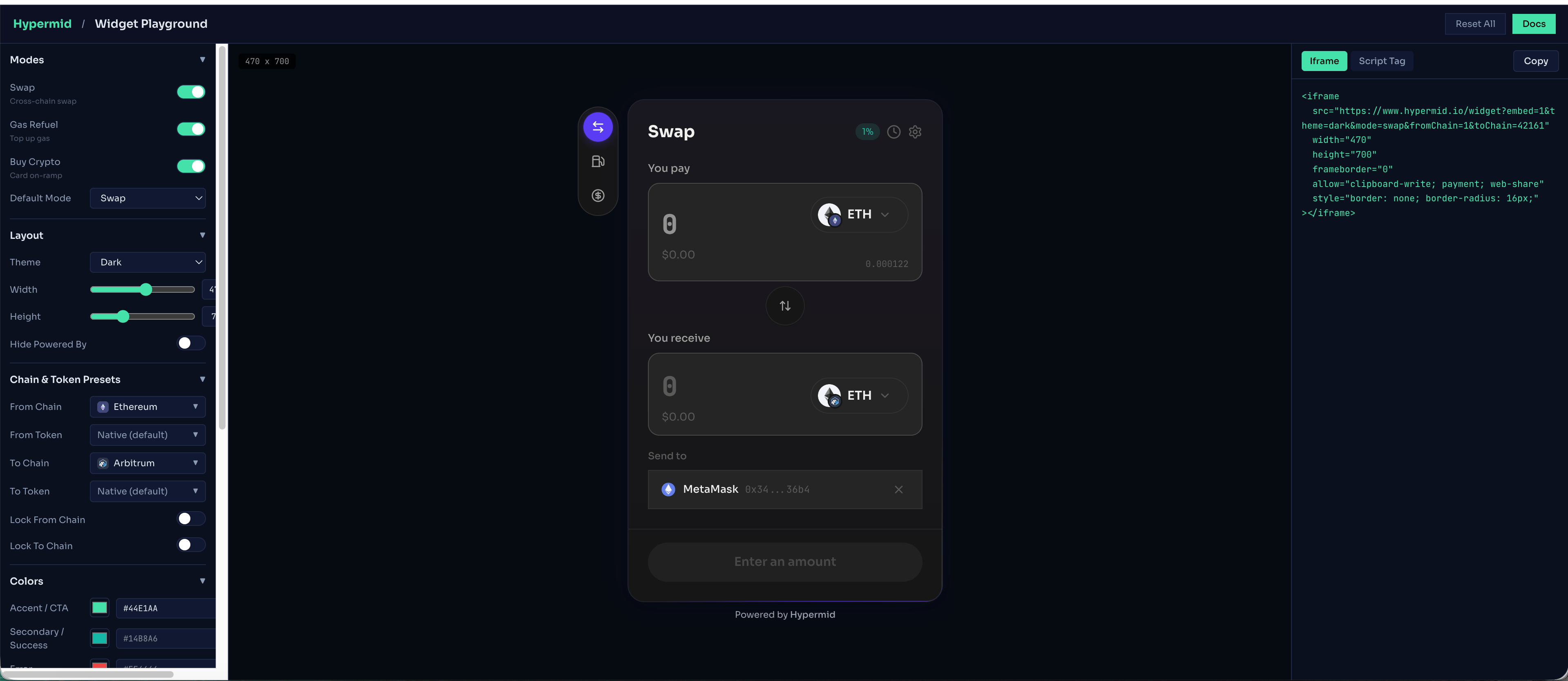
The Hypermid widget playground lets you tune every visual knob — colors, fonts, border radius, modes, chains, layout — and watch a live preview update in real time. When you're happy, copy a single-line iframe or script tag and drop it into your site.
The playground needs the full browser width to be comfortable to use (three columns: controls, live preview, code export). Opening it in its own tab gives the best experience.
## What you can customize
Enable / disable Swap, Gas Refuel, and Buy Crypto modes individually. Set the default active mode.
**Accent / CTA** (primary brand colour), **Secondary / Success** (confirm button, save settings, positive states), **Error** (error states, high price impact), **Button** (overrides the CTA gradient).
Card background, card inner background, **Input Area Box** (also controls the token picker pills), text primary, text secondary, border.
Choose from 25 Google Fonts including Inter, Sora, Poppins, Space Grotesk, DM Sans, Manrope, and more.
Adjust card corner radius (0–32 px) and button corner radius (0–24 px) independently.
Set widget width (320–600 px) and height (580–1000 px). Min 580 px height is required for the on-ramp form.
Search all 90+ chains and 20 000+ tokens. Pre-select default source and destination. Optionally lock chain selectors so users can't change them.
Set `apiKey` (optional) to attribute swaps to your account for fee tracking and analytics. Optionally hide the "Powered by Hypermid" footer (subject to partnership agreement).
## Chain & token preset builder
If you only need to lock down a chain/token combination — not a full theme — the standalone preset builder is faster:
Browse all supported chains (EVM + Solana + Bitcoin + NEAR Intents). Pick a source and destination pair. Copy a ready-made iframe URL or script-tag config.
## Embed code formats
The playground generates two embed code formats. Both use the same theming params — pick the one that fits your site.
### Direct iframe
A single `
```
### Script tag
Uses the embed.js script for programmatic control, event callbacks, and dynamic config updates:
```html theme={"system"}
```
Use the **script tag** format if you need [event callbacks](/widget/events) or programmatic control of the widget after mount.
## Token address notes
* **Native tokens** (ETH, BNB, MATIC, etc.) use `0x0000000000000000000000000000000000000000`
* **ERC-20 tokens** use the token's contract address on that chain
* **Solana tokens** use the SPL token mint address
* Token addresses are **chain-specific** — USDC on Ethereum has a different address than USDC on Arbitrum