This guide covers the full lifecycle of a cross-chain swap through Hypermid: discovering chains and tokens, getting a quote, executing the swap, and tracking its status.

Endpoints You’ll Use

StepEndpointPurpose
1GET /v1/chainsDiscover supported blockchains
2GET /v1/tokensList tokens available on a chain
3GET /v1/quoteGet the best swap price and route
4POST /v1/executeGet transaction data to sign
5GET /v1/statusTrack swap progress until completion
Steps 1-2 are optional if you already know the chain IDs and token addresses. Most integrations start at Step 3.

Overview

A cross-chain swap moves tokens from one blockchain to another in a single user action. Hypermid’s smart routing engine evaluates multiple bridge strategies in parallel across 90+ supported blockchains — including EVM chains, Solana, Bitcoin, XRP, PulseChain, TON, and more — and returns the optimal path automatically.
Swapping to/from PulseChain? See the PulseChain Swaps guide for specific examples and token addresses.

Swap lifecycle

Every swap follows four phases: discover available chains and tokens, get a quote, execute the transaction, and track its status until settlement.

1. Discovery

The app fetches all supported chains and tokens from the routing engine. The engine maintains a unified registry across all bridge types, so the user sees one clean token list regardless of which underlying strategy will fulfill the swap.

2. Quote

Hypermid queries its bridge providers simultaneously for the selected token pair. The routing engine compares all returned routes — factoring in output amount, gas cost, and estimated execution time — and surfaces a single best quote. The user never chooses a provider.

3. Execute

The user approves the transaction in their wallet. For EVM chains, this may involve a token approval step followed by the swap transaction itself. The app records a pending swap event via the Hypermid API, which gets updated on completion — no duplicate records.

4. Track

The app polls the status endpoint using the source transaction hash. Status transitions through PENDINGCOMPLETED (or FAILED), and the UI reflects progress in real time. Cross-chain settlement ranges from seconds to minutes depending on the bridge strategy used.

Architecture

Hypermid abstracts away bridge complexity behind a single smart routing engine. The user interacts with Hypermid — never with individual bridge providers.
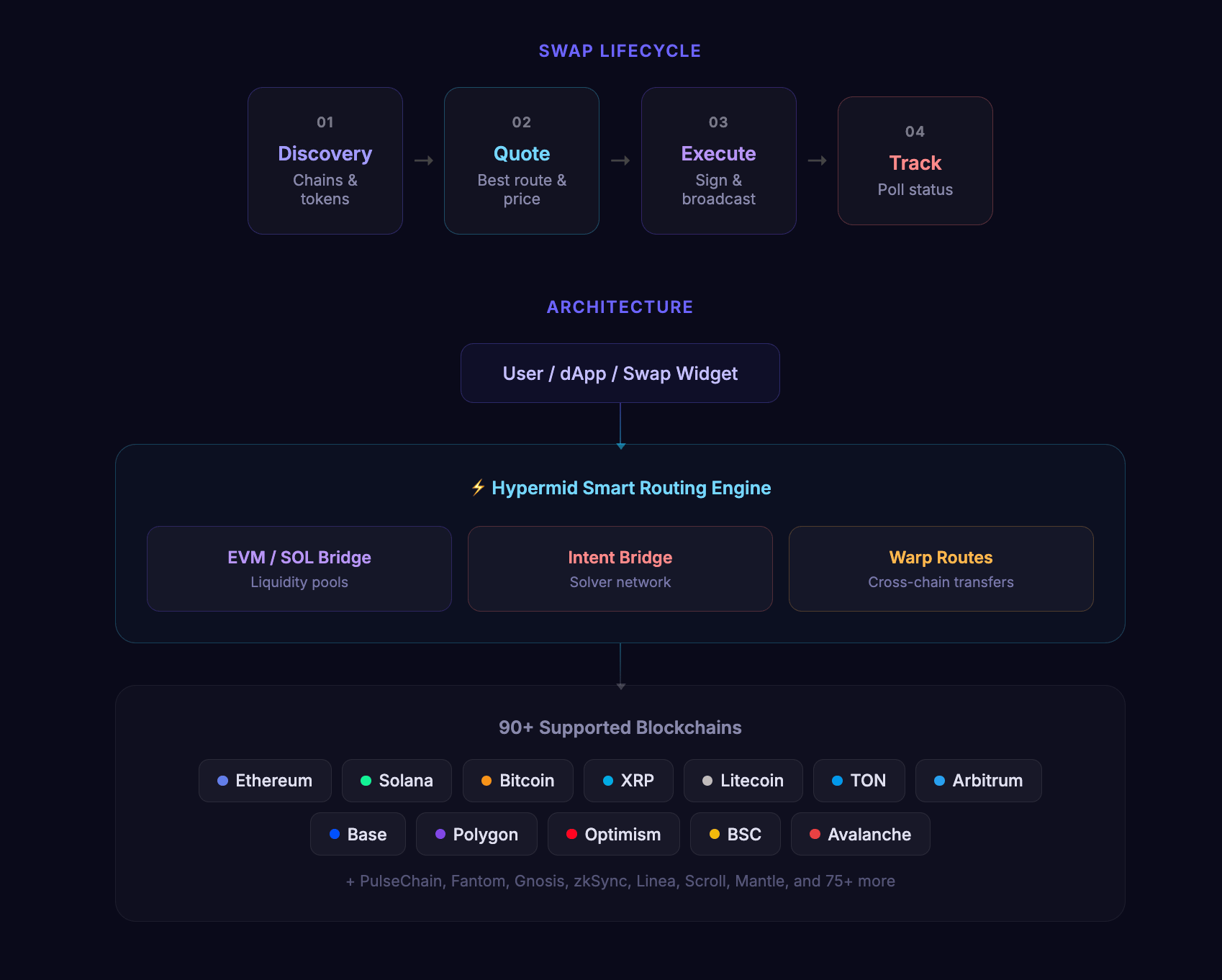
Hypermid architecture: user and dApp connect to the smart routing engine, which orchestrates EVM/SOL bridge, intent bridge, and warp routes to 90+ blockchains

Bridge strategies

StrategyMechanismCoverage
EVM / SOL bridgeRoutes through liquidity pools across EVM-compatible chains and SolanaEthereum, Polygon, Arbitrum, Optimism, BSC, Avalanche, Base, Solana, and 70+ more
Intent bridgeMatches counterparties via a solver network for optimal fillsCross-chain swaps where solver competition yields better pricing
Warp routesDirect token transfers via standardised messagingExtended coverage for chains like PulseChain and other networks outside core bridge support
The routing engine selects the best strategy per swap automatically. In many cases, a single swap may be split across strategies to optimise for price and speed.

Step 1: Discover Supported Chains

Fetch the list of supported blockchains to populate your chain selector.
const chains = await client.getChains();
console.log(chains.data);
// [{ id: 1, name: "Ethereum", type: "EVM", nativeToken: {...} }, ...]

Step 2: Discover Tokens

Fetch tokens available on your source and destination chains.
const tokens = await client.getTokens({
  chains: [1, 42161], // Ethereum and Arbitrum
});

const ethTokens = tokens.data.tokens[1];    // Tokens on Ethereum
const arbTokens = tokens.data.tokens[42161]; // Tokens on Arbitrum

Step 3: Get a Quote

Request the best swap route for your token pair and amount.
const quote = await client.getQuote({
  fromChain: 1,                                                  // Ethereum
  toChain: 42161,                                                // Arbitrum
  fromToken: "0x0000000000000000000000000000000000000000",        // ETH
  toToken: "0xaf88d065e77c8cC2239327C5EDb3A432268e5831",          // USDC on Arbitrum
  fromAmount: "1000000000000000000",                              // 1 ETH in wei
  fromAddress: "0xd8dA6BF26964aF9D7eEd9e03E53415D37aA96045",
  slippage: 0.03,                                                 // 3% slippage tolerance
});

if (quote.error) {
  console.error("Quote failed:", quote.error.code, quote.error.message);
  return;
}

console.log("Estimated output:", quote.data.estimate.toAmount);
console.log("Estimated USD value:", quote.data.estimate.toAmountUSD);
console.log("Provider:", quote.data.tool);
console.log("Execution time:", quote.data.estimate.executionDuration, "seconds");
Set slippage to control how much price movement is acceptable. The default is typically 3% (0.03). For stablecoin swaps, consider using 0.5% (0.005).

Step 4: Execute the Swap

Submit the swap for execution. The response depends on the route type.
const execution = await client.execute({
  fromChain: 1,
  toChain: 42161,
  fromToken: "0x0000000000000000000000000000000000000000",
  toToken: "0xaf88d065e77c8cC2239327C5EDb3A432268e5831",
  fromAmount: "1000000000000000000",
  fromAddress: "0xd8dA6BF26964aF9D7eEd9e03E53415D37aA96045",
  toAddress: "0xd8dA6BF26964aF9D7eEd9e03E53415D37aA96045",
  slippage: 0.03,
});

if (execution.error) {
  console.error("Execution failed:", execution.error.code);
  return;
}

Handling the Response

The execution response contains either a transactionRequest (wallet mode) or a depositAddress (manual deposit mode).

Wallet Mode (EVM/Solana)

if (execution.data.transactionRequest) {
  const txRequest = execution.data.transactionRequest;

  // Send the transaction using your wallet/signer
  const tx = await wallet.sendTransaction({
    to: txRequest.to,
    data: txRequest.data,
    value: txRequest.value,
    gasLimit: txRequest.gasLimit,
    gasPrice: txRequest.gasPrice,
  });

  console.log("Transaction sent:", tx.hash);

  // Wait for confirmation
  const receipt = await tx.wait();
  console.log("Confirmed in block:", receipt.blockNumber);
}

Manual Deposit Mode

if (execution.data.depositAddress) {
  // For wallet-connected users: use the transactionRequest if available
  if (execution.data.transactionRequest) {
    const tx = await wallet.sendTransaction(execution.data.transactionRequest);
  }

  // For manual deposits: display the deposit address to the user
  console.log("Deposit address:", execution.data.depositAddress);
  console.log("Memo (if required):", execution.data.memo);
  console.log("Deposit ID:", execution.data.depositId);
}

Step 5: Track Status

Transaction Status

Poll GET /v1/status with the transaction hash:
async function pollStatus(txHash: string, fromChain: number, toChain: number) {
  while (true) {
    const status = await client.getStatus({ txHash, fromChain, toChain });

    console.log("Status:", status.data.status);

    if (status.data.status === "DONE") {
      console.log("Swap complete!");
      console.log("Destination tx:", status.data.receiving?.txHash);
      return status.data;
    }

    if (status.data.status === "FAILED") {
      console.error("Swap failed:", status.data.message);
      throw new Error("Swap failed");
    }

    // Poll every 10 seconds
    await new Promise((resolve) => setTimeout(resolve, 10000));
  }
}

Manual Deposit Status

For manual deposit routes, poll GET /v1/execute/deposit/status with the deposit ID:
const depositStatus = await client.getDepositStatus({
  depositId: execution.data.depositId,
});

console.log("Deposit status:", depositStatus.data.status);

Complete Example

Here’s a full working example that handles both route types:
import { Hypermid } from "@hypermid/sdk";

const client = new Hypermid({ apiKey: process.env.HYPERMID_API_KEY });

async function swap() {
  // 1. Get a quote
  const quote = await client.getQuote({
    fromChain: 1,
    toChain: 42161,
    fromToken: "0x0000000000000000000000000000000000000000",
    toToken: "0xaf88d065e77c8cC2239327C5EDb3A432268e5831",
    fromAmount: "1000000000000000000",
    fromAddress: "0xYourAddress",
  });

  if (quote.error) {
    throw new Error(`Quote failed: ${quote.error.message}`);
  }

  console.log(`Swapping ${quote.data.estimate.fromAmountUSD} USD`);
  console.log(`Estimated receive: ${quote.data.estimate.toAmountUSD} USD`);

  // 2. Execute the swap
  const exec = await client.execute({
    fromChain: 1,
    toChain: 42161,
    fromToken: "0x0000000000000000000000000000000000000000",
    toToken: "0xaf88d065e77c8cC2239327C5EDb3A432268e5831",
    fromAmount: "1000000000000000000",
    fromAddress: "0xYourAddress",
    toAddress: "0xYourAddress",
  });

  if (exec.error) {
    throw new Error(`Execute failed: ${exec.error.message}`);
  }

  // 3. Handle based on route type
  if (exec.data.transactionRequest) {
    const tx = await wallet.sendTransaction(exec.data.transactionRequest);
    await tx.wait();

    // 4. Poll status
    let status;
    do {
      await new Promise((r) => setTimeout(r, 10000));
      status = await client.getStatus({
        txHash: tx.hash,
        fromChain: 1,
        toChain: 42161,
      });
    } while (status.data.status === "PENDING");

    console.log("Final status:", status.data.status);
  } else if (exec.data.depositAddress) {
    console.log("Send tokens to:", exec.data.depositAddress);
    if (exec.data.memo) console.log("With memo:", exec.data.memo);
  }
}

swap().catch(console.error);

Error Handling

Always handle these common errors:
Error CodeWhat to Do
NO_ROUTE_FOUNDTry different token pairs, increase amount, or widen slippage
SLIPPAGE_ERRORIncrease the slippage parameter and retry
RATE_LIMITBack off and retry after meta.rateLimit.reset
UPSTREAM_TIMEOUTRetry the request after a brief delay
See the Error Handling Guide for comprehensive strategies.